Loading...
Searching...
No Matches

Easy In-App Purchases Integration to
Make Your Unity App Profitable


Adapty Unity SDK is a native wrapper around Adapty iOS SDK and Adapty Android SDK. Both SDKs are written in pure Swift/Kotlin, all wrapped into a C# lib.
Requires Unity 2022.3 or newer and Android API 21 or newer. iOS builds require Xcode 26 or newer and a deployment target of 15.0 or newer: AdaptySDK-iOS 4.x is a swift-tools-version: 6.2 package, and an older toolchain refuses to resolve it. Open the exported project as Unity-iPhone.xcworkspace — building Unity-iPhone.xcodeproj directly fails at link time with ld: framework 'Pods_UnityFramework' not found.
Why Adapty?
- No server code implementation. Integrate in-app purchases with server-side receipt validation in minutes — in your own paywall or using the no-code flow builder.
- No-code flow builder. Create beautiful, natively rendered single- or multi-screen flows in the no-code editor and display them in your app. With flows, you can start getting paid instantly or implement engaging onboardings in your app.
- On-the-fly paywalls price testing. Test different prices, duration, offers, messages, and designs simultaneously, all without new app releases.
- Full customer's payment history. Explore the user's payment events from the trial start to subscription cancellation or billing issues.
- 3rd-party integrations. Send subscription events to 3rd-party analytics, attribution, and ad services with no coding, even if the user uninstalls the app.
- Advanced analytics. Analyze your app real-time metrics with advanced filters, such as Ad network, Ad campaign, country, A/B test, etc.
Talk to Us to Learn More
Integrate IAPs within a few hours without server coding
Adapty handles everything, from free trials to refunds, in a simple, developer-friendly SDK.
- Free trials, upgrades, downgrades, crossgrades, family sharing, renewals, promo offers, intro offers, promo codes, and more – Adapty SDK handles them all through one API.
- Easy subscription management.
- One-time purchases and lifetime subscriptions supported.
- Sync subscribers' states across iOS, Android, and Web.
Design flows in the no-code Flow Builder
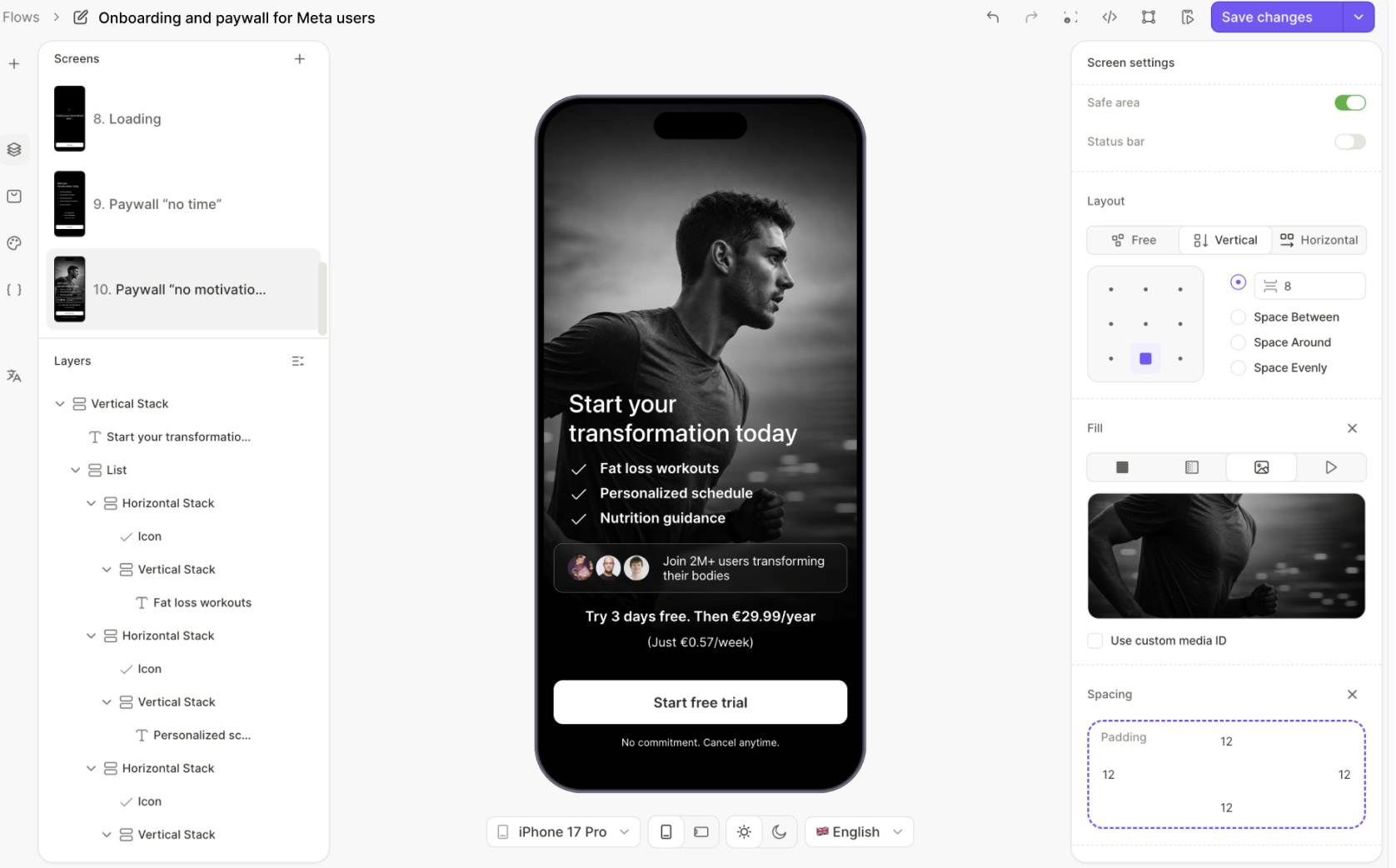
With the Adapty Flow Builder, you can visually design complete user experiences — from single-screen paywalls to multi-step onboardings, surveys, and quizzes.
- Flexible customizable flows: Build any kind of flow: a single-screen paywall, a multi-step sequence, a survey, or anything in between.
- Native rendering: The Adapty SDK renders flows natively without web views to ensure a seamless user experience.
- Update without redeploying: Change copy, design, pricing, or logic any time. Updates reach your users without an app release.
Adapty automatically renders your flow and handles all the complex purchase logic, receipt validation, and subscription management behind the scenes.
Test paywalls & prices on Unity without app releases

- Optimize in-app subscriptions with the paywall A/B testing. Conversions, trials, revenue, cancellations, and more — everything is calculated for you: each paywall and each A/B test.
- Change images, colors, layouts, and literally anything using the no-code builder or a custom JSON. Configure different prices, trial periods, promo offers, and more in Adapty without app releases.
Real-time analytics for your Unity app

- Manage the subscription's state without managing transactions.
- 99.5% accuracy.
- View and analyze data by attributes, such as status, channels, campaigns, and more.
- Filter, group, and measure metrics by attribution, platform, custom users' segments, and more in a few clicks.
Mobile app monetization's largest community
Ask questions, participate in discussions about Adapty-related topics, become a part of our community for app developers and marketers. Learn how to monetize your app, ask questions, post jobs, read industry news and analytics. Ad free.

Get started
Follow our quickstart guide to install and configure Adapty SDK. Set up purchases in hours instead of weeks 🚀
v4 works in flows. Paywalls and onboardings are both fetched with Adapty.GetFlow and shown with AdaptyUI.CreateFlowView, whether you built them in the Paywall Builder or the new Flow Builder. The separate onboarding API of v3 still works but is deprecated and warns at compile time, so start new integrations on flows.
Installing with Package Manager: Add package from git URL, with the path suffix — the package does not sit at the repository root — and the version suffix, which pins the tag:
https://github.com/adaptyteam/AdaptySDK-Unity.git?path=/Packages/com.adapty.unity-sdk#4.1.2
Drop #4.1.2 and Package Manager resolves the default branch instead, which moves with every release — you get whatever was merged into main last, and it changes under you without notice. Pin the tag.
The SDK depends on com.unity.nuget.newtonsoft-json, which Package Manager installs for you and which every platform needs — the SDK assembly is gated on it. It also depends on External Dependency Manager, but only for iOS, where it resolves the Swift package; Android never goes through it, since its dependencies ship in a bundled .androidlib that Unity adds to the Gradle build itself. Neither dependency can arrive with a .unitypackage, which carries assets only.
Installing from a .unitypackage: take the latest from Releases, and add com.unity.nuget.newtonsoft-json before importing. Until it is there the SDK assembly is skipped by a define constraint, so your calls into Adapty will not compile. Adapty SDK > Install Dependencies is what fixes that, and it lives in an Editor assembly carrying no such constraint — so it is available as long as the rest of your scripts still compile. Once they do not, because they are the code calling Adapty, Unity stops loading Editor assemblies and Newtonsoft has to come from Package Manager by hand. With Newtonsoft in place, that menu item adds whatever else is missing, including the OpenUPM scoped registry External Dependency Manager is published on.
Upgrading from 3.x: delete Assets/AdaptySDK before importing. A .unitypackage never removes files, and 4.0 drops 62 sources that 3.x shipped — the whole JSON/ folder among them. Left where they are, they compile into the same assembly as the new ones: 35 of them redeclare a type 4.0 also declares, and the rest reference types it no longer has. Either way the SDK does not compile, and because the assembly is gated on Newtonsoft the errors appear only once Newtonsoft is installed.
It also upgrades an External Dependency Manager older than the SDK needs — but only one installed as a package. A copy imported from Google's own .unitypackage under Assets/ has no version Package Manager can read, so the menu item leaves it alone and warns instead; update that one yourself.
Upgrading? MIGRATION-v3.17-to-v4.1.md takes a 3.x project straight to 4.1 — the renamed paywall and attribution APIs, the new Newtonsoft.Json dependency, the order to install things in, and the fallback files the 4.1 natives expect you to re-download.
Read the release notes and known issues before you integrate: they carry the limitations of the pinned native SDKs, which no amount of configuration on your side will work around.
Kids Mode on iOS
Apps in the App Store Kids Category must not link the advertising identifier. Add the ADAPTY_KIDS_MODE scripting define to build such an app:
- the KidsMode trait is enabled on the AdaptySDK-iOS Swift package during the iOS build, so IDFA, AdSupport and AppTrackingTransparency are compiled out of the binary;
- apple_idfa_collection_disabled is forced in the runtime configuration.
Swift package traits need Xcode 26 or newer, which is already the floor for v4 on iOS — Kids Mode adds no requirement of its own.
Set the define in Player Settings > Other Settings > Scripting Define Symbols. The build step that enables the trait lives in an Editor assembly, and Player Settings is what Editor assemblies are compiled with.
A build profile's scripting defines also work, but only once Unity has recompiled the Editor assemblies for them. Switching build profiles and building in the same session — especially from a script — can run the build against Editor assemblies compiled for the previous profile, in which case the trait is silently not applied while the runtime still reports Kids Mode. The SDK fails the iOS build when it detects that state, so it cannot ship. Setting the define in Player Settings and letting the Editor recompile before building avoids the situation entirely.
BuildPlayerOptions.extraScriptingDefines never works for this define: it reaches the player assemblies only, and it is invisible to every Editor API, so the mismatch cannot be detected either.
Contributing
- Feel free to open an issue, we check all of them or drop us an email at [email protected] and tell us everything you want.
- Want to suggest a feature? Just contact us or open an issue in the repo.
Like Adapty SDK?
So do we! Feel free to star the repo ⭐️⭐️⭐️ and make our developers happy!
License
Adapty is available under the MIT license. Click here for details.